Loops
In general, statements are executed sequentially − The first statement in a method is executed first, followed by the second, and so on. There may be a situation when you need to execute a block of code several number of times.
Programming languages provide various control structures that allow more complicated execution paths.
A loop statement allows us to execute a statement or group of statements multiple times. The following diagram illustrates a loop statement −
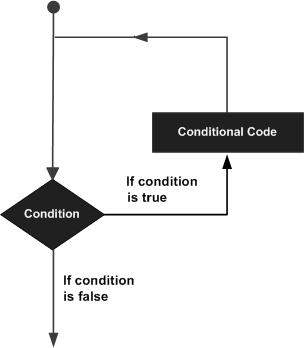
Spla programming language provides the following types of loops to handle looping requirements.
| Sr.No. | Loop Type & Description |
|---|---|
| 1 | while loop
Repeats a statement or group of statements while a given condition is TRUE. It tests the condition before executing the loop body. |
| 2 | for loop
Executes a sequence of statements multiple times and abbreviates the code that manages the loop variable. |
| 3 |
nested loops
You can use one or more loop inside any another while, or for loop. |
Loop Control Statements
The Loop control statements change the execution from its normal sequence. When the execution leaves a scope, all automatic objects that were created in that scope are destroyed.
Spla supports the following control statements.
| Sr.No. | Control Statement & Description |
|---|---|
| 1 |
break statement
Terminates the loop statement and transfers execution to the statement immediately following the loop. |
| 2 |
continue statement
Causes the loop to skip the remainder of its body and immediately retest its condition prior to reiterating. |
| 3 |
pass statement
The pass statement in Spla is used when a statement is required syntactically but you do not want any command or code to execute. |
Let us go through the loop control statements briefly.
Spla - while Loop Statements
A while loop statement in Spla programming language repeatedly executes a target statement as long as a given condition is true.
Syntax
The syntax of a while loop in Spla programming language is −
@@ expression:
   statement(s);
Here, statement(s) may be a single statement or a block of statements with uniform indent. The condition may be any expression, and true is any non-zero value. The loop iterates while the condition is true.
When the condition becomes false, program control passes to the line immediately following the loop.
In Spla, all the statements indented by the same number of character spaces after a programming construct are considered to be part of a single block of code. Spla uses indentation as its method of grouping statements.
Flow Diagram

Here, a key point of the while loop is that the loop might not ever run. When the condition is tested and the result is false, the loop body will be skipped and the first statement after the while loop will be executed.
Example
int count = 0;
@@ count < 9:
   << 'The count is:'+ count;
   count = count + 1;

<< 'Good bye!';
Output
When the above code is executed, it produces the following result −
The count is: 0
The count is: 1
The count is: 2
The count is: 3
The count is: 4
The count is: 5
The count is: 6
The count is: 7
The count is: 8
Good bye!
The block here, consisting of the print and increment statements, is executed repeatedly until count is no longer less than 9. With each iteration, the current value of the index count is displayed and then increased by 1.
The Infinite Loop
A loop becomes infinite loop if a condition never becomes FALSE. You must be cautious when using while loops because of the possibility that this condition never resolves to a FALSE value. This results in a loop that never ends. Such a loop is called an infinite loop.
An infinite loop might be useful in client/server programming where the server needs to run continuously so that client programs can communicate with it as and when required.
Example
int var = 1;
int num = 0;
@@ var == 1 :  !! This constructs an infinite loop
   <<'Enter a number  :';
   >>   num ;
   << 'You entered: '+ num;

<< 'Good bye!'
Output
When the above code is executed, it produces the following result −
Enter a number  :20
You entered:  20
Enter a number  :29
You entered:  29
Enter a number  :3
You entered:  3
Enter a number  :11
You entered:  11
Enter a number  :22
You entered:  22
Enter a number  :
The above example goes in an infinite loop and you need to use CTRL+C to exit the program.
Spla 3 - for Loop Statements
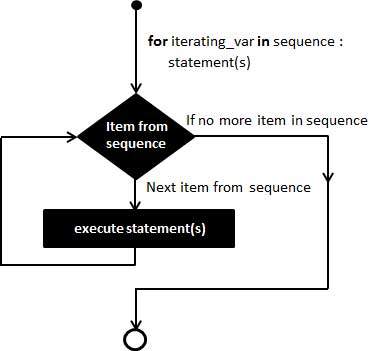
The for statement in Spla has the ability to iterate over the items of any sequence, such as a list or a string.
Syntax
@@ iterating_var = 1 to sequence:
   statements(s);
If a sequence contains an expression list, it is evaluated first. Then, the first item in the sequence is assigned to the iterating variable iterating_var. Next, the statements block is executed. Each item in the list is assigned to iterating_var, and the statement(s) block is executed until the entire sequence is exhausted.
Flow Diagram
Example
The following program uses a for loop to display number 1 to 10.
@@ int i = 1 to  10:
   <<< i+1;
Output
When the above code is executed, it produces the following result −
1
2
3
4
5
6
7
8
9
10
Spla - Nested loops
Spla programming language allows the usage of one loop inside another loop. The following section shows a few examples to illustrate the concept.
Syntax
@@ iterating_var = 1 to sequence:
   @@ iterating_var = 1 to sequence:
      statements(s);
   statements(s);
The syntax for a nested while loop statement in Spla programming language is as follows −
@@ expression:
   @@ expression:
      statement(s)
   statement(s)
A final note on loop nesting is that you can put any type of loop inside any other type of loop. For example a for loop can be inside a while loop or vice versa.
Example
The following program uses a nested-for loop to display multiplication tables from 1-10.
int k = 0;
@@ int i = 1 to 10:
   @@ int j = 1 to 10:
      k = i*j;
      << k;
   <<'\n';
Output
When the above code is executed, it produces the following result −
1 2 3 4 5 6 7 8 9 10
2 4 6 8 10 12 14 16 18 20
3 6 9 12 15 18 21 24 27 30
4 8 12 16 20 24 28 32 36 40
5 10 15 20 25 30 35 40 45 50
6 12 18 24 30 36 42 48 54 60
7 14 21 28 35 42 49 56 63 70
8 16 24 32 40 48 56 64 72 80
9 18 27 36 45 54 63 72 81 90
10 20 30 40 50 60 70 80 90 100